Cable Maps, Rack Photos, and the Hidden Dependencies Inside a Server Room
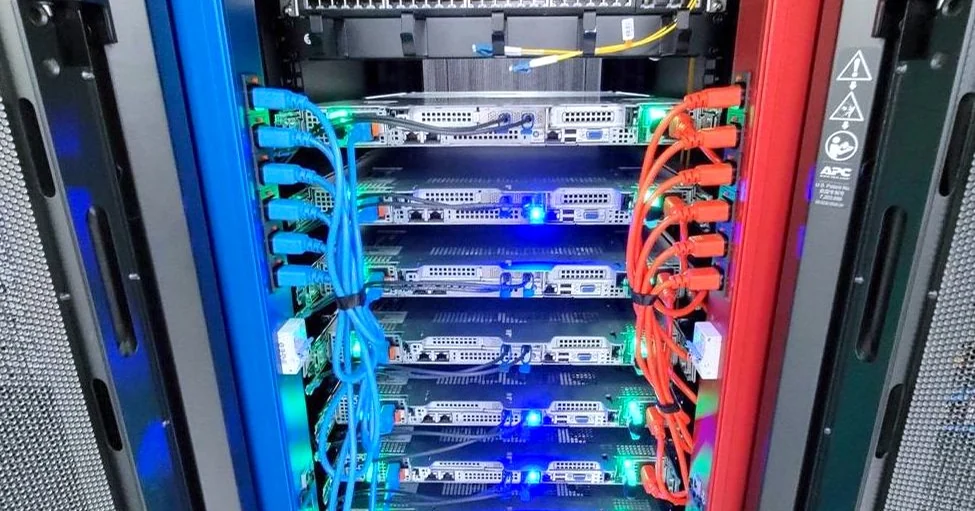
Most small businesses think of a server move as a hardware problem: lift the racks, unplug the cables, plug them in somewhere else. In practice, the trouble usually starts with connections nobody wrote down. A switch uplink that feeds a printer on the second floor, a patch cable that quietly carries the only path to a backup appliance, a power strip that everyone forgot was shared. Before anyone touches equipment, the goal is to turn the physical room into a record that someone other than the original builder can read. This article covers a fresh angle on that work: treating cable maps and rack photos as decision tools rather than tidy paperwork.
Why Cable Maps Matter More Than Equipment Lists
An equipment list tells you what exists. A cable map tells you what depends on what. When a move goes wrong, the failure is almost never a missing server; it is a missing link. A server that powers on in the new location is useless if the network path that reaches it was never recreated, or if the line that carries a fax or door-access signal ran through a patch panel no one labeled.
Start by asking a plain question for every device in the room: if this port went dark, what would stop working? Answers will surface things your inventory never captured. Write each answer beside the port or cable it describes. You are building a dependency record, and the value is in the uncomfortable entries, such as a legacy line that feeds one system nobody remembers owning.
Rack Photos That Actually Help
Photos are only useful if they answer questions someone will ask during a move. Take a front and rear photo of each rack, then a close photo of every patch panel and power distribution unit, with the labels legible. Shoot from a consistent height and distance so that the images can be compared side by side later.
Name each file with the rack identifier, the face (front or rear), and the date. A folder of unnamed images is nearly as bad as no images. Keep the originals on a device or shared folder that you control, and note who took them, since the person who photographed the rack is often the one who can explain an odd arrangement.
Questions to Settle Before Anyone Unplugs Anything
The checklist below is designed to surface gaps while there is still time to close them. Work through it with the people who use the systems, not only the people who own the hardware.
First, for each cable bundle, can you name the source port, the destination port, and the business function it serves? Second, for each power feed, which devices depend on it, and is any device on a single feed with no alternate? Third, which connections are undocumented, and who can explain them? Fourth, which labels are missing or ambiguous, and what temporary labels will you apply? Fifth, which equipment has a serial number recorded, and which does not? Sixth, where will each cable end up in the new location, and has anyone confirmed that the destination exists and is free?
If a question cannot be answered, mark it as an open item and assign it to a named person with a date. Open items are normal. Unassigned open items are how moves fail.
Turning Documentation Into a Working Record
Documentation goes stale the moment someone makes an undocumented change, so set a rule: any change during the project updates the map the same day. Use a single shared document or spreadsheet rather than scattered notes. Include the revision date at the top and a short change log at the bottom.
Before you finalize the record, walk the room with someone who did not create it. Ask them to trace one cable from the rack to its end point using only your documentation. If they cannot, the document is not finished. This small test catches more errors than any review meeting.
A Short Comparison: Thin Versus Usable Records
A thin record lists devices and their locations, with a handful of photos and no port-level detail. It looks complete but fails the first time someone asks what a specific cable does. A usable record ties each physical connection to a business function, flags single points of failure, notes who owns each system, and includes photos that show the labels. The difference is roughly the time a careful person spends tracing connections, and that time is far cheaper during planning than during a cutover window.
Whatever you produce, make sure it answers the questions your team will actually ask on move day. A cable map nobody consults is only decoration.
If you want outside help documenting a site or planning the move, ask any provider to describe exactly what they will capture, who will review it with you, and what remains your responsibility afterward.